
Customer Portal
A complete billing management interface for your customers to manage payment methods, view invoices, and purchase credits.
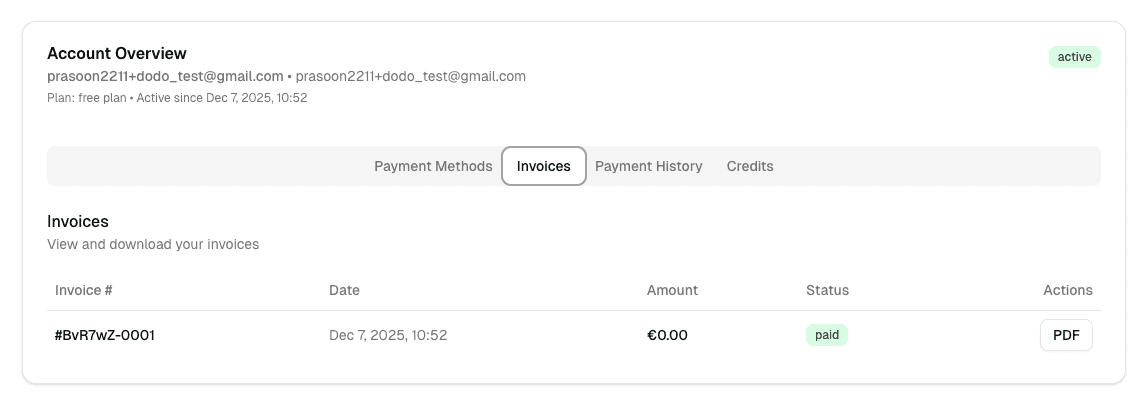
The Customer Portal is a drop-in component that gives your customers a complete self-service billing experience. It lets them manage payment methods, view invoices, track payments, and purchase credits.
Installation
npx shadcn@latest add https://getlumen.dev/pricing-table.jsonThe Customer Portal component is included in the same package as the Pricing Table.
Frontend Integration
Import the CustomerPortalShadcn component and add it to your billing or account page:
import { CustomerPortalShadcn } from "@/components/ui/pricing-table";

export default function BillingPage() {
  const { userId } = useAuth(); // Your auth hook

  return (
    <CustomerPortalShadcn
      lumenHandlerUrl="/api/lumen"
      externalCustomerId={userId}
    />
  );
}
Required Props
lumenHandlerUrl: URL of your backend Lumen handler endpoint (e.g.,/api/lumenorhttps://your-api.com/api/lumen)externalCustomerId: The user ID of the currently logged-in customer
Optional Props
className: Additional CSS classes for the Card wrapperapiBaseUrl: API base URL for real-time events (default:https://api.getlumen.dev/v1)environment: Payment provider environment -'test'or'live'(default:'live'). Use'test'during development with Dodo Payments.
Features
Payment Methods Tab
Customers can:
- View all saved payment methods with card details (brand, last 4 digits, expiry)
- Add new payment methods (supports both Stripe and Dodo Payments)
- Set a default payment method for subscription charges
- Remove payment methods not linked to active subscriptions
Invoices Tab
Displays a list of invoices with:
- Invoice number and status
- Issue date and paid date
- Total amount with currency formatting
- Document type indicators (standard, cancellation, credit note)
- PDF download buttons
Payment History Tab
Shows all payment transactions with:
- Amount and currency
- Transaction date/time
- Payment status with color-coded badges
- Error messages for failed payments
Credits Tab
Allows customers to:
- Browse available credit top-ups for their subscription
- View real-time credit usage with visual progress bars
- See credit balance (remaining vs. total allowance)
- Purchase additional credits with quantity selection
- Track credit expiry dates
Backend Setup
The Customer Portal requires the same Lumen handler endpoint used by the Pricing Table. If you've already set up the handler, no additional configuration is needed.
// api/lumen/[...all]/route.ts
import { NextRequest, NextResponse } from "next/server";
import { auth } from "@clerk/nextjs/server"; // or your auth provider
import { lumenNextHandler } from "@getlumen/server";

const handler = async (request: NextRequest) => {
  const { userId } = await auth();
  if (!userId) return NextResponse.json({ error: "Unauthorized" }, { status: 401 });

  return NextResponse.json(await lumenNextHandler({ request, userId }));
};

export { handler as GET, handler as POST, handler as PUT, handler as DELETE, handler as PATCH, handler as OPTIONS, handler as HEAD };
import express from 'express';
import { lumenExpressHandler } from '@getlumen/server';
const app = express();
app.all('/api/lumen/*', requireAuth, lumenExpressHandler({
getUserId: (req) => req.user.id,
mountPath: '/api/lumen',
}));import { Hono } from 'hono';
import { lumenHonoHandler } from '@getlumen/server';
const app = new Hono();
app.all('/api/lumen/*', requireAuth, lumenHonoHandler({
getUserId: (c) => c.get('userId'),
mountPath: '/api/lumen',
}));Full Example
import { CustomerPortalShadcn } from "@/components/ui/pricing-table";
import { useSession } from "next-auth/react"; // or your auth provider

export default function AccountBillingPage() {
  const { data: session } = useSession();

  // Use test environment for development
  const environment = process.env.NODE_ENV === "development" ? "test" : "live";

  if (!session?.user?.id) {
    return <div>Please log in to view billing information.</div>;
  }

  return (
    <div className="container mx-auto py-8">
      <h1 className="text-2xl font-bold mb-6">Billing & Subscription</h1>
      <CustomerPortalShadcn
        lumenHandlerUrl="/api/lumen"
        externalCustomerId={session.user.id}
        apiBaseUrl={process.env.NEXT_PUBLIC_LUMEN_API_URL || "https://api.getlumen.dev/v1"}
        environment={environment}
        className="max-w-4xl"
      />
    </div>
  );
}
Payment Provider Support
The Customer Portal supports both Stripe and Dodo Payments for adding payment methods:
- Stripe: Uses Stripe Elements for secure card input with real-time event streaming for setup confirmation
- Dodo Payments: Opens an overlay or new tab for payment method setup with automatic polling for completion
The payment provider is determined automatically based on your Lumen configuration.
Customization
The component is built with shadcn/ui and Tailwind CSS, making it easy to customize:
- Modify the component source directly in
@/components/ui/pricing-table.tsx - Override styles using the
classNameprop - Adjust colors, spacing, and typography through Tailwind classes